
Quick Start
Adding an Automated Daily Status Workflow to Your Repo
Section titled “Adding an Automated Daily Status Workflow to Your Repo”Estimated time: 10 minutes
In this guide you will add an existing, pre-baked workflow to an existing GitHub repository where you are a maintainer - the automated Daily Repo Status Report, running in GitHub Actions.
The aim here is to become familiar with automated AI: to install something that will run automatically, recurringly, in the context of your repository.
Prerequisites
Section titled “Prerequisites”Before installing, ensure you have:
- AI Account - GitHub Copilot, Anthropic Claude or OpenAI Codex
- GitHub Repository - A repository where you have write access
- GitHub Actions enabled - Check in Settings → Actions
- GitHub CLI (
gh) v2.0.0+ - Install here. Check version:gh --version - Operating System: Linux, macOS, or Windows with WSL
Step 1 - Install the extension
Section titled “Step 1 - Install the extension”Install the GitHub Agentic Workflows extension:
gh extension install github/gh-awStep 2 - Add the sample workflow and trigger a run
Section titled “Step 2 - Add the sample workflow and trigger a run”From your repository root run:
gh aw add-wizard githubnext/agentics/daily-repo-statusThis will take you through an interactive process to:
- Check prerequisites - Verify repository permissions.
- Select an AI Engine - Choose between Copilot, Claude, or Codex.
- Set up the required secret -
COPILOT_GITHUB_TOKEN(a separate GitHub token with Copilot access — distinct from the defaultGITHUB_TOKEN),ANTHROPIC_API_KEY, orOPENAI_API_KEY. See Authentication for setup instructions. - Add the workflow - Adds the workflow and lock file to
.github/workflows/. - Optionally trigger an initial run - Starts the workflow immediately.
Step 3 - Wait for the workflow to complete
Section titled “Step 3 - Wait for the workflow to complete”An automated workflow run can take 2-3 minutes.
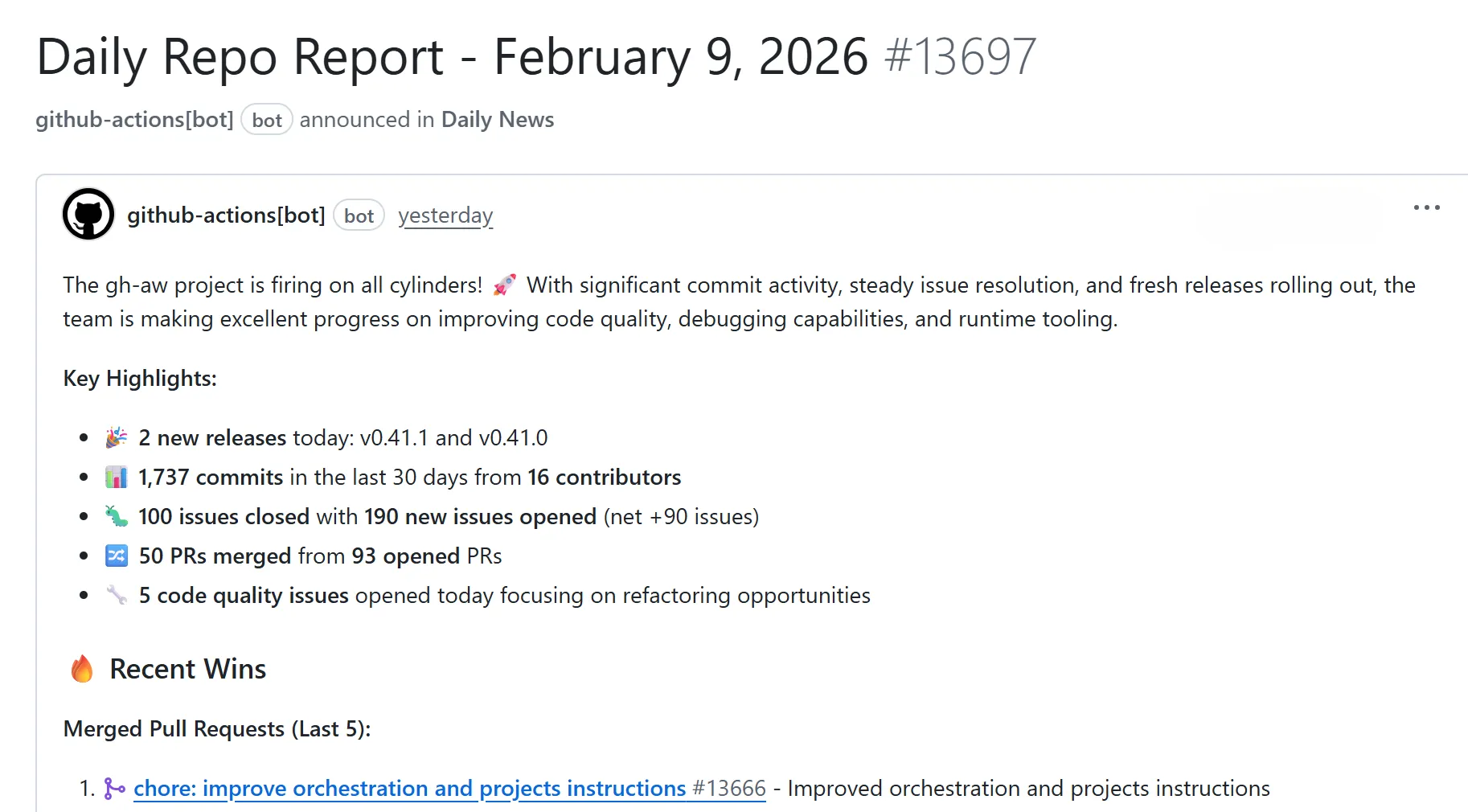
Once your initial run is complete, a new issue will be created in your repository with a “Daily Repo Report”. The report will be automatically generated and will analyze:
- Recent repository activity (issues, PRs, discussions, releases, code changes)
- Progress tracking, goal reminders and highlights
- Project status and recommendations
- Actionable next steps for maintainers
The report will look something like this:
Step 4 - Customize your workflow (optional)
Section titled “Step 4 - Customize your workflow (optional)”With GitHub Agentic Workflows, you are in control! Your repository automation is fully customizable. You should shape your repo automation to match your priorities and your needs.
To customize it now:
-
Open the workflow markdown file located at
.github/workflows/daily-repo-status.mdin your repository. -
Edit the section “What to include” to list things you are having trouble with regularly in your repository: your issue blacklog, your CI setup, your testing, the performance of your software, your roadmap. Any or all of these, or anything else you want to improve. You can also customize the style and process sections to guide the coding agent’s behavior.
-
If you have changed the frontmatter (the YAML configuration block between
---markers at the top of the file), regenerate the workflow YAML by running:gh aw compile -
Commit and push to your repository.
-
Optionally trigger another run by running:
gh aw run daily-repo-status
After waiting for the workflow to complete, check the new issue created with your updated report!
What’s next?
Section titled “What’s next?”There are hundreds of other ways to use GitHub Agentic Workflows! Explore some of these in Peli’s Agent Factory.
Continue learning with these resources: