
Using at Scale in Organizations
When agentic workflows move beyond a single repository and into an organization or enterprise, something qualitatively different becomes possible. Workflows can coordinate or scale across dozens of repositories simultaneously.
In this guide, we will explore recurring topics in organization and enterprise adoption of GitHub Agentic Workflows, including how to:
- Use cases in organizations and enterprises
- Share, reuse, and govern workflows across an organization
- Coordinate agentic work across multiple repositories securely
- Introduce production writes safely and roll back when needed
- Track and reduce AI token costs at scale
- Use with GitHub Enterprise Server and GitHub Enterprise Cloud
Use Cases in Organizations and Enterprises
Section titled “Use Cases in Organizations and Enterprises”In organizations and enterprises, workflows can:
- Roll out changes org-wide
- Assess code quality across 100s of repos
- Synchronize dependency updates
- Propagate coding policy changes
- Shrink backlogs in multiple maintained repos
- Enforce coding standards across teams
- Aggregate issue tracking into a single control plane
The possibilities are vast. Challenges include secure authentication, cost management, and operational control at scale.
Reusing and Sharing Workflows in the Organization
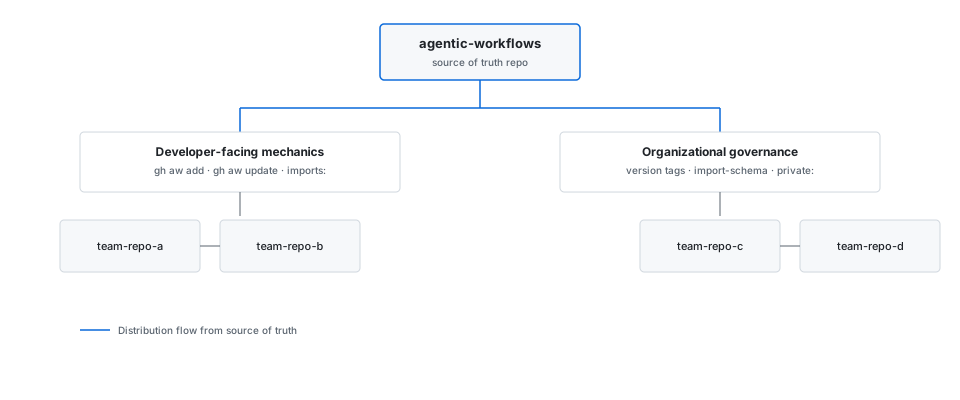
Section titled “Reusing and Sharing Workflows in the Organization”There are two complementary layers to workflow distribution across an organization.
Adding Existing Workflows covers the developer-facing mechanics: use gh aw add or gh aw add-wizard to install a workflow from another repository, and gh aw update to pull in upstream changes while preserving local edits. Use imports: in workflow frontmatter to pull in shared components (tool configs, MCP server definitions, prompt snippets) — see Imports for the full reference.
Sharing Workflows in the Organization covers the organizational governance layer: recommended techniques like maintaining a central agentic-workflows repository as the source of truth, versioning with exact tags (@v1.2.0), moving major refs (@v1), or SHA pins, parameterized shared components via import-schema, and controlling discoverability with private: true.
Private Repositories
Section titled “Private Repositories”Workflows that read from or write to repositories other than the one they run in require explicit authentication. Key references:
- Authentication — PATs and GitHub Apps for cross-repository access; GitHub Apps are preferred for automatic token rotation and fine-grained scoping
- Cross-Repository Safe Outputs — writing issues, PRs, and comments to external repositories via
target-repo; reading from private repositories withallowed-repos - Checkout — checking out private repositories in workflow jobs
- Fork Support — handling pull requests from forks safely
Security and Networking
Section titled “Security and Networking”Agentic workflows run inside GitHub Actions and can make outbound network requests through the network access sandbox layer. See the Network Configuration guide for how to declare allowed domains, configure MCP server connectivity, and restrict outbound access. Threat Detection provides runtime monitoring for prompt injection and unauthorized tool use.
Configuration Governance explains how to apply consistent model, budget, timeout, and guardrail defaults at enterprise, organization, and repository scope. Use these layered defaults to establish organization-wide baselines while retaining explicit repository exceptions.
Working Across Multiple Repositories
Section titled “Working Across Multiple Repositories”GitHub Agentic Workflows has multiple features and design patterns for coordinating work across repositories. Key technical references:
- Cross-Repository Safe Outputs — writing issues, PRs, and comments to external repositories via
target-repo; reading from private repositories withallowed-repos - Authentication — PATs and GitHub Apps for cross-repository access; GitHub Apps are preferred for automatic token rotation and fine-grained scoping
- GitHub Tools — GitHub API toolsets available to the agent across repositories
- OrchestratorOps — dispatching parallel worker workflows for large-scale multi-repo operations
- MultiRepoOps — multi-repo design patterns
A particularly important design pattern for multi-repo operations is CentralRepoOps, where a central control repository dispatches work to target repositories or aggregates issues from component repositories. See the CentralRepoOps pattern for detailed examples and templates.
Safe Rollout
Section titled “Safe Rollout”Safe Rollout describes how to move from report-only or staged behavior to production writes with evidence and control. One technique inside that progression is shadow evaluation, where the workflow writes to a safe non-production target before promotion.
Large Repositories with Many Issues
Section titled “Large Repositories with Many Issues”Repositories with thousands of open issues require chunked or parallel processing rather than a single long-running agent job. BatchOps covers the main strategies: chunked pagination across scheduled runs, matrix fan-out for parallel sharding, and rate-limit-aware sub-batching. For queues that grow dynamically or span multiple days, WorkQueueOps with cache-memory provides durable progress tracking that survives interruptions. Use Rate Limiting Controls to cap per-user and per-window dispatch counts.
Large Monorepos
Section titled “Large Monorepos”Monorepos with many packages or deep histories can cause agent jobs to spend most of their time on repository checkout. Use sparse-checkout in the checkout: field to fetch only the paths a workflow actually needs — this can reduce checkout time from tens of minutes to seconds. For workflows that need to reason about the full codebase without fetching it, the QMD search tool runs vector similarity search over indexed repository content without requiring a full clone. When full history is genuinely needed (e.g., changelog generation or blame analysis), fetch-depth: 0 is available but should be combined with sparse paths to limit clone size.
See GitHub Repository Checkout for the full configuration reference and examples, including sparse checkout patterns and multi-repository checkouts.
Cost Management
Section titled “Cost Management”Running agentic workflows at scale consumes compute and AI inference tokens. Use the Cost Management reference for an overview of token budgeting, model selection, and spend tracking. Related references:
- Rate Limiting Controls — cap per-user and per-window run counts to prevent runaway spend
- Cost Management — track and budget AI Credits (AIC) across workflows
Measuring Impact
Section titled “Measuring Impact”Measure whether organization-wide workflows produce accepted results as well as what they cost. Start with run volume, successful runs, AIC, accepted safe outputs, and AIC per accepted outcome; compare similar workflow and output types over a stable observation window.
Measuring Impact describes the practical
measurement loop, including how to evaluate safe outputs with gh aw outcomes
and use outcome data to identify low-value or overlapping automation.
OpenTelemetry
Section titled “OpenTelemetry”GitHub Agentic Workflows can be configured to emit OpenTelemetry traces and spans for each workflow run, covering activation, agent execution, safe-output operations, and MCP tool calls. These can be forwarded to any OTLP-compatible backend for dashboards, alerting, and cost analysis.
Azure OpenAI BYOK
Section titled “Azure OpenAI BYOK”Organizations that route Copilot inference through their own Azure OpenAI deployment can use API keys or Microsoft Entra authentication. See Azure OpenAI BYOK for provider configuration, credential setup, and workflow frontmatter.
GitHub Enterprise Server and Cloud
Section titled “GitHub Enterprise Server and Cloud”For deployments on GitHub Enterprise Server or GitHub Enterprise Cloud with data residency, see the Enterprise Configuration reference for runner configuration, token scoping, and endpoint customization. If you are using GitHub Enterprise Cloud with data residency (*.ghe.com), see Debugging GHE Cloud with Data Residency for step-by-step setup and common issues.
Self-Hosted Runners
Section titled “Self-Hosted Runners”Organizations that need to run agentic workflows on their own infrastructure — for network isolation, compliance, or cost reasons — can use self-hosted runners. See the Self-Hosted Runners guide for configuration requirements, ARC/Kubernetes setup, and GHES-specific considerations. For Kubernetes runner scale sets, ARC DinD for Copilot Coding Agent provides the complete Docker-in-Docker deployment configuration. Runners must be Linux with Docker support; use the runs-on: frontmatter field to target them.
A/B Experiments
Section titled “A/B Experiments”The A/B Experiments feature lets you define named prompt variants in workflow frontmatter and measure their effect across runs. The activation job selects a variant using a balanced round-robin counter so every variant is exercised equally. Use gh aw experiments list and gh aw experiments analyze to inspect distribution and statistical readiness. This feature is experimental — see the Experiments Specification for the full schema.