
Automated issue triage on GitHub
AI issue triage with GitHub Agentic Workflows means running an agent whenever a new issue arrives so it can classify the report, set priority labels, detect likely duplicates, and ask for missing details. The workflow stays read-only during analysis, and gh-aw performs the resulting GitHub writes through safe outputs.
Labels and priorities are applied automatically by this sample. Document how contributors can request corrections and how maintainers review disputed classifications. Start with advisory reports and configure human review before enabling consequential routing or classification actions.
To install this sample, use:
gh aw add-wizard githubnext/agentics/issue-triageHow it works
Section titled “How it works”flowchart LR
A[Gather issue context] --> B[Assess and classify]
B --> C[Apply metadata and report]
The workflow first checks whether the report is complete and searches for related issues. It then sets only well-supported issue types and labels, distinguishes duplicates from related work, assesses whether the issue is ready for a coding agent, and posts a concise triage report or focused clarifying questions.
Example output
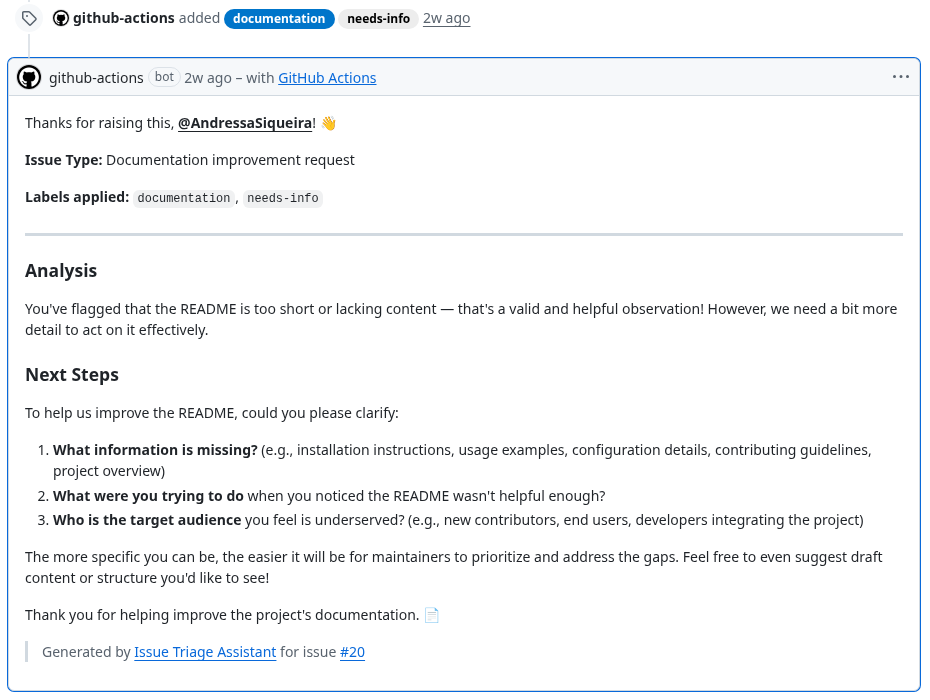
Section titled “Example output”For a short documentation report, Issue Triage applied documentation and needs-info, explained the classification, and asked focused questions that a maintainer can act on.
Workflow source
Section titled “Workflow source”---description: | Triages new and reopened issues by assessing completeness, setting issue type and priority labels, finding duplicates, and posting a concise maintainer-facing report with actionable next steps.
on: issues: types: [opened, reopened] reaction: eyes
permissions: contents: read issues: read
safe-outputs: add-labels: allowed: - bug - feature - question - needs-info - priority/p0 - priority/p1 - priority/p2 - duplicate - invalid - spam max: 4 add-comment: max: 1 set-issue-type: max: 1
timeout-minutes: 10---
# Issue Triage Assistant
Analyze issue #${{ github.event.issue.number }} and help maintainers understandand route it quickly. Base every conclusion on the issue, its discussion, andrepository context. Do not invent missing details.
## 1. Gather context
1. Read the issue and its comments.2. Inspect the repository's available labels and issue types.3. Search open and recent closed issues for the same symptoms, request, error messages, affected component, or expected behavior.4. Consult relevant repository documentation when it clarifies expected behavior or contribution requirements.
## 2. Assess completeness
Decide whether the issue contains enough information for meaningful triage.
For a bug, look for reproduction steps, expected and actual behavior, relevantlogs or errors, and environment details. For a feature or task, look for theproblem being solved, desired outcome, and enough scope to understand the request.
If essential details are missing:
- apply `needs-info` when that label exists- ask only the specific questions needed to proceed- do not guess a type, priority, or solution
If the issue is clearly spam, gibberish, or a test submission, apply `spam` or`invalid` when available and explain the assessment briefly. Do not perform theremaining triage.
## 3. Classify and prioritize
### Issue type
If no issue type is set, choose the single best supported type, such as Bug,Feature, or Task. Leave it unset when the content does not support a confidentchoice.
### Labels
Choose only labels that already exist and are directly supported by the issue.Apply at most one type label and one priority label, plus `needs-info` or`duplicate` when appropriate.
Use priority labels consistently:
- `priority/p0`: active security incident, severe data loss, or broad outage- `priority/p1`: major regression or blocker with no reasonable workaround- `priority/p2`: normal actionable work without immediate operational impact
Labels can trigger other automation. Prefer leaving a label unset over applyingone speculatively.
## 4. Find duplicates and related issues
Distinguish between:
- **Duplicate**: high confidence that another issue describes the same problem or request. Apply `duplicate` and cite the issue number.- **Related**: shared component or context, but a distinct problem or request. Mention it without applying `duplicate`.
Include no more than three useful matches. Never mark an issue duplicate basedonly on similar words in the title.
## 5. Assess next steps
Classify coding-agent suitability:
- **Suitable**: requirements and success criteria are clear, and the scope is self-contained.- **Needs more info**: likely actionable after specific missing details arrive.- **Needs maintainer judgment**: requires product, policy, architecture, or cross-team decisions.
Suggest a focused next step when the evidence supports one. Do not turn triageinto a speculative implementation plan.
## 6. Report
Post one concise comment for maintainers:
```markdown## Triage report
[Two or three sentences summarizing the issue and recommended routing.]
| Assessment | Result | Reasoning ||---|---|---|| Type | [type or unset] | [brief evidence] || Priority | [priority or unset] | [brief evidence] || Coding agent | [suitability] | [brief evidence] |
### Similar issues- #[number] — [duplicate or related, with a brief reason]
### Next step[One focused action or the specific information still needed.]```
Omit “Similar issues” when there are no useful matches. For an incomplete issue,replace the table with concise clarifying questions. Keep the report factual,respectful, and easy to scan.add-labels and add-comment matter for security because the agent does not receive direct write access to issues. gh-aw validates label names and comment output before posting, which reduces the risk of prompt injection turning repository analysis into unrestricted writes.
Every label listed under allowed must already exist in the target repository. bug, feature, and question ship as GitHub defaults, but labels such as needs-info, priority/p0, priority/p1, and priority/p2 do not, and applying a missing label fails at runtime. Create them before the first run with gh label create needs-info (repeat per label) or from the repository’s Settings > Labels page.
Review the first few triage reports and adjust the allowed labels and priority definitions to match the repository’s conventions. After editing, run gh aw compile and commit both the Markdown workflow and its generated lock file.