
GitHub Agentic Workflows Quickstart
Adding an Automated Daily Status Workflow to Your Repo
Section titled “Adding an Automated Daily Status Workflow to Your Repo”GitHub Agentic Workflows lets developers define AI-powered repository automation in Markdown with YAML frontmatter (the configuration block between the --- markers at the top of the file) and run AI agents through GitHub Actions. By the end of this guide, you will have a recurring agentic workflow running in your repository with GitHub Copilot, Claude Code, OpenAI Codex, Google Gemini, or Pi. This guide takes about 10 minutes and requires only the GitHub CLI.
Estimated time: 10 minutes
In this guide you will add an existing workflow to a GitHub repository where you are a maintainer: the automated Daily Repo Status Report, running in GitHub Actions.
The aim here is to become familiar with automated AI: to install something that will run automatically, recurrently, in the context of your repository.
Prerequisites
Section titled “Prerequisites”Before installing, ensure you have:
- AI Account - GitHub Copilot, Anthropic Claude, OpenAI Codex, or Google Gemini. Pi uses your Copilot, Anthropic, or OpenAI account, depending on the provider prefix in
model:. If you already have GitHub Copilot, start there — it requires no extra account setup. - GitHub Repository - A repository where you have write access
- GitHub Actions enabled - Check in Settings → Actions
- GitHub CLI (
gh) v2.0.0+ - Install here. Check version:gh --version - Logged in to GitHub CLI - Verify with
gh auth statusand rungh auth login --scopes repo,workflowif needed - Operating System: Linux, macOS, or Windows with WSL
Step 1 - Install the extension
Section titled “Step 1 - Install the extension”Install the GitHub Agentic Workflows extension:
gh extension install github/gh-awStep 2 - Add the sample workflow and trigger a run
Section titled “Step 2 - Add the sample workflow and trigger a run”From your repository root, run this command:
gh aw add-wizard githubnext/agentics/repo-statusadd-wizard accepts workflow references in <owner>/<repo>/<workflow-name> format. In this guide, githubnext/agentics is the public githubnext/agentics examples repository, and repo-status is one of the sample workflows it publishes.
repo-status gathers recent repository activity (issues, PRs, discussions, releases, code changes) and opens a GitHub issue summarizing productivity insights, community highlights, and recommended next steps, as described in its frontmatter:
description: | This workflow creates daily repo status reports. It gathers recent repository activity (issues, PRs, discussions, releases, code changes) and generates engaging GitHub issues with productivity insights, community highlights, and project recommendations.See the full source at workflows/repo-status.md.
This will take you through an interactive process to:
- Check prerequisites - Verify repository permissions.
- Select an AI engine - Choose GitHub Copilot, Claude Code, OpenAI Codex, Google Gemini, or Pi.
- Configure AI engine authentication - Follow the instructions or see below.
- Add the workflow - Adds the workflow file (
.md) and its generated GitHub Actions lock file to.github/workflows/, either by direct push or a pull request. - Optionally add skills for agentic authoring and debugging - Adds additional files for interactive authoring and debugging of agentic workflows.
- Optionally trigger an initial run - Starts the workflow immediately.
Configuring authentication
Section titled “Configuring authentication”Copilot
Use organization billing:
If organization billing is enabled in your organization, you can choose Use copilot-requests in the wizard. It adds copilot-requests: write to the workflow permissions and uses the per-run GitHub Actions token for inference. This path requires an organization Copilot subscription with centralized billing.
Use COPILOT_GITHUB_TOKEN:
- Create a fine-grained Personal Access Token (PAT) under your user account.
- Under Permissions → Account permissions, set Copilot Requests to Read, then generate the token.
- Add it as a repository secret from your repository root with
gh secret set COPILOT_GITHUB_TOKEN < /path/to/token.txt, or use the GitHub UI. See Copilot authentication for both paths.
Claude
Setting up ANTHROPIC_API_KEY:
- Create an API key in Anthropic Console.
- Add it as a repository secret from your repository root with
gh secret set ANTHROPIC_API_KEY < /path/to/key.txt, or use the GitHub UI. See Authentication for more detail.
For keyless authentication, configure Anthropic Workload Identity Federation with a federation rule in your Anthropic workspace and grant the workflow id-token: write. GitHub Actions exchanges a short-lived OIDC token for Anthropic credentials, so you don’t need a repository secret.
A Claude subscription token from claude login (CLAUDE_CODE_OAUTH_TOKEN) is not supported. The CLI detects it and fails with an error naming CLAUDE_CODE_OAUTH_TOKEN and pointing to ANTHROPIC_API_KEY or Anthropic WIF as the supported alternatives.
Follow Using Claude Code with GitHub Agentic Workflows for the complete setup.
Codex
Setting up OPENAI_API_KEY:
- Create an API key in OpenAI API keys.
- Add it as a repository secret from your repository root with
gh secret set OPENAI_API_KEY < /path/to/key.txt, or use the GitHub UI. See Authentication for more detail.
Tip: CODEX_API_KEY is also accepted and takes precedence over OPENAI_API_KEY — if you have already stored the key under that name, no action is needed. See Authentication for details.
Gemini
Setting up GEMINI_API_KEY:
- Create an API key in Google AI Studio.
- Add it as a repository secret from your repository root with
gh secret set GEMINI_API_KEY < /path/to/key.txt, or use the GitHub UI. See Authentication for more detail.
For keyless authentication, configure Google Workload Identity Federation with a Google Cloud Workload Identity Pool and Provider for GitHub Actions, and grant the service account Vertex AI User permissions. GitHub Actions exchanges a short-lived OIDC token for Google Cloud credentials, so you don’t need a repository secret.
Pi
Pi chooses authentication from the provider prefix in model:. It uses Copilot authentication by default, ANTHROPIC_API_KEY for anthropic/..., and CODEX_API_KEY or OPENAI_API_KEY for openai/... and codex/.... For example, use model: copilot/gpt-5.4, model: anthropic/claude-sonnet-5, or model: openai/gpt-5.
Pi also requires tools.github.mode: gh-proxy and tools.cli-proxy: true. Follow Using Pi with GitHub Agentic Workflows for the complete setup.
Step 3 - Wait for the workflow to complete
Section titled “Step 3 - Wait for the workflow to complete”An automated workflow run can take 2-3 minutes.
To watch the run while it’s in flight:
- From the browser: open the Actions tab of your repository and select the most recent workflow run.
- From the CLI: run
gh aw statusto list workflow state, orgh run watchto stream the latest run.
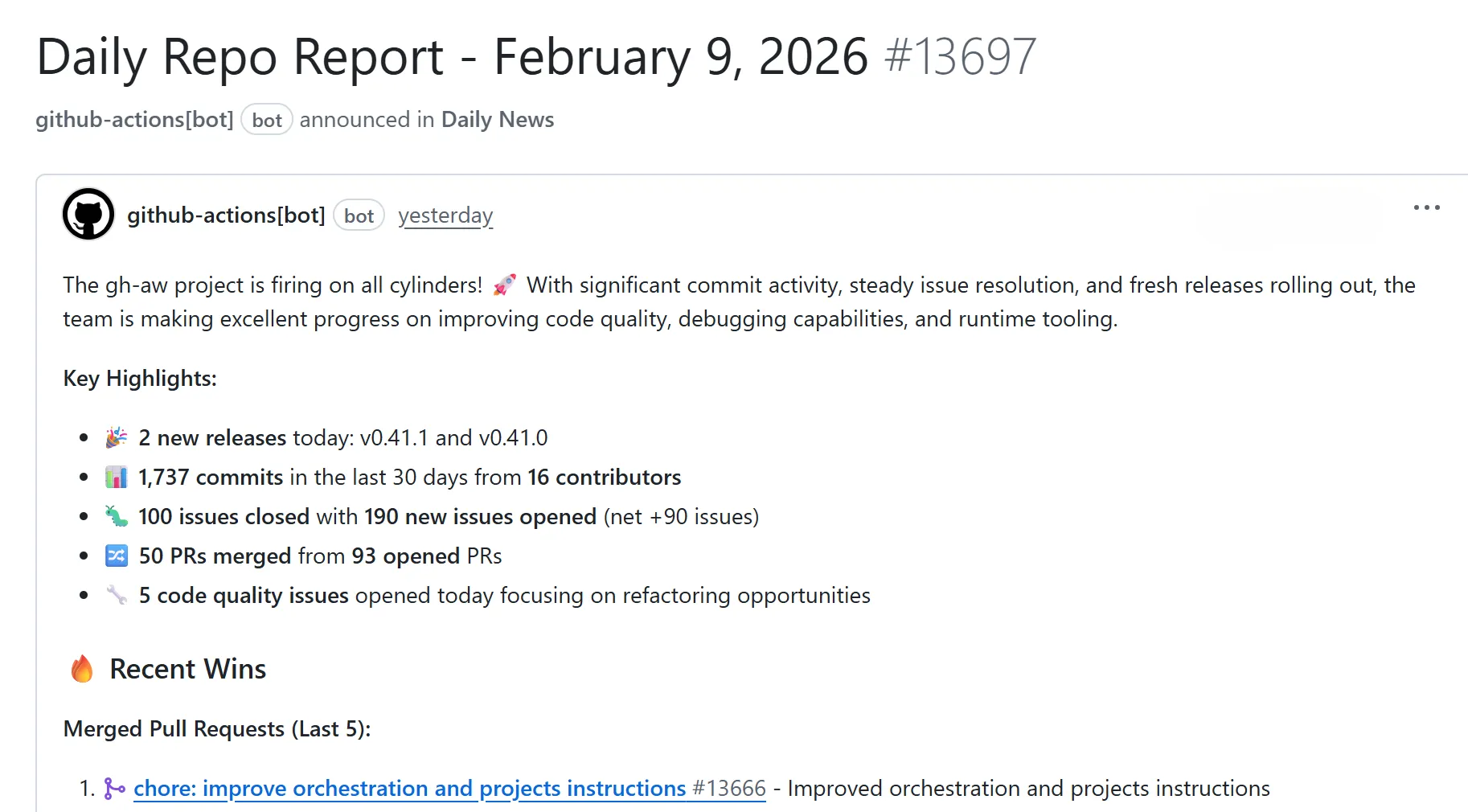
When the run succeeds, a new issue titled with “Daily Repo Report” appears in the Issues tab of your repository. If the run fails, open the run from the Actions tab to view step logs and error output.
Once your initial run is complete, a new issue will be created in your repository with a “Daily Repo Report”. The report will be automatically generated and will analyze:
- Recent repository activity (issues, PRs, discussions, releases, code changes)
- Progress tracking, goal reminders and highlights
- Project status and recommendations
- Actionable next steps for maintainers
The report will look something like this:
Step 4 - Customize your workflow (optional)
Section titled “Step 4 - Customize your workflow (optional)”With GitHub Agentic Workflows, you are in control! Your repository automation is fully customizable. You should shape your repo automation to match your priorities and your needs.
To customize it now:
-
Open the workflow markdown file located at
.github/workflows/repo-status.mdin your repository. -
Edit the section “What to include” to list things you are having trouble with regularly in your repository: your issue backlog, your CI setup, your testing, the performance of your software, your roadmap. Any or all of these, or anything else you want to improve. You can also customize the style and process sections to guide the coding agent’s behavior.
-
If you changed the frontmatter (the YAML configuration block between the
---markers at the top of the file), regenerate the compiled workflow by running:gh aw compile -
Commit and push both files to your repository.
-
Optionally trigger another run by running:
gh aw run repo-status
After waiting for the workflow to complete, check the new issue created with your updated report!
What’s next?
Section titled “What’s next?”There are hundreds of other ways to use GitHub Agentic Workflows! Explore the Agent Factory blog series — a 19-part tour of real-world agentic workflows authored by the gh-aw maintainers — for examples covering issue triage, releases, quality checks, and more.
Continue learning with these resources:
- Create a New Workflow
- How Agentic Workflows Work
- AI Engines for GitHub Agentic Workflows
- GitHub Agentic Workflows Gallery
- Security Architecture
- Frequently Asked Questions
For a structured, hands-on learning experience, see the gh-aw-workshop — a self-contained workshop repository that walks you through building and customizing agentic workflows step by step. Fork it and follow along at your own pace.
Related guides
Section titled “Related guides”These use-case guides show specific workflow patterns built on the same foundation you just set up:
- AI Issue Triage on GitHub — label, deduplicate, and ask clarifying questions on new issues automatically
- Automated AI Pull Request Review — review diffs and post feedback comments when PRs are opened
- AI-Generated Release Notes and Reports — generate release summaries and repo reports on a schedule
- Keeping Documentation Up to Date Automatically — propose documentation updates as pull requests when code changes