Why use evals?
Turn “that answer looks good” into a check you can repeat when your skills, agents, or model change.
An eval gives AI a task and checks the result against what you expected. Here, two checks look for completed work and reject unfinished work.
Fictional illustration, not measured results.
Search is done, but Export isn't ready for users. The AI mistakenly includes both as ready.
Why it matters: Release notes tell people what they can use. Listing unfinished work promises a feature that is not ready.
Start with the skill's requirement: include completed work only.
Your eval caught unfinished Export.
You revise the skill. Keep the original. Retest with the same backlog, requirement and expected result.
Use Copilot more effectively
You add instructions to help Copilot do a job. But do they work on the tasks you care about? Did an edit fix one mistake and introduce another? Is a skill still contributing, or just adding instructions?
An eval is a repeatable test of AI work. You give it a realistic task and inputs, define what a good result looks like, then check what happened. GitHub Copilot Evals helps you create these tests, run them, and inspect results in your development workflow.
Start with a mistake you can recognize
Suppose a release-note skill announces an unfinished feature. The answer reads well, but it promises something users cannot use. An eval can check that completed work is included and unfinished work is left out.
See the release-note example before installing anything.
Three questions worth asking
| Your question | How an eval helps |
|---|---|
| Does this skill or agent do the job? | Check a real task against the outcome you expected. |
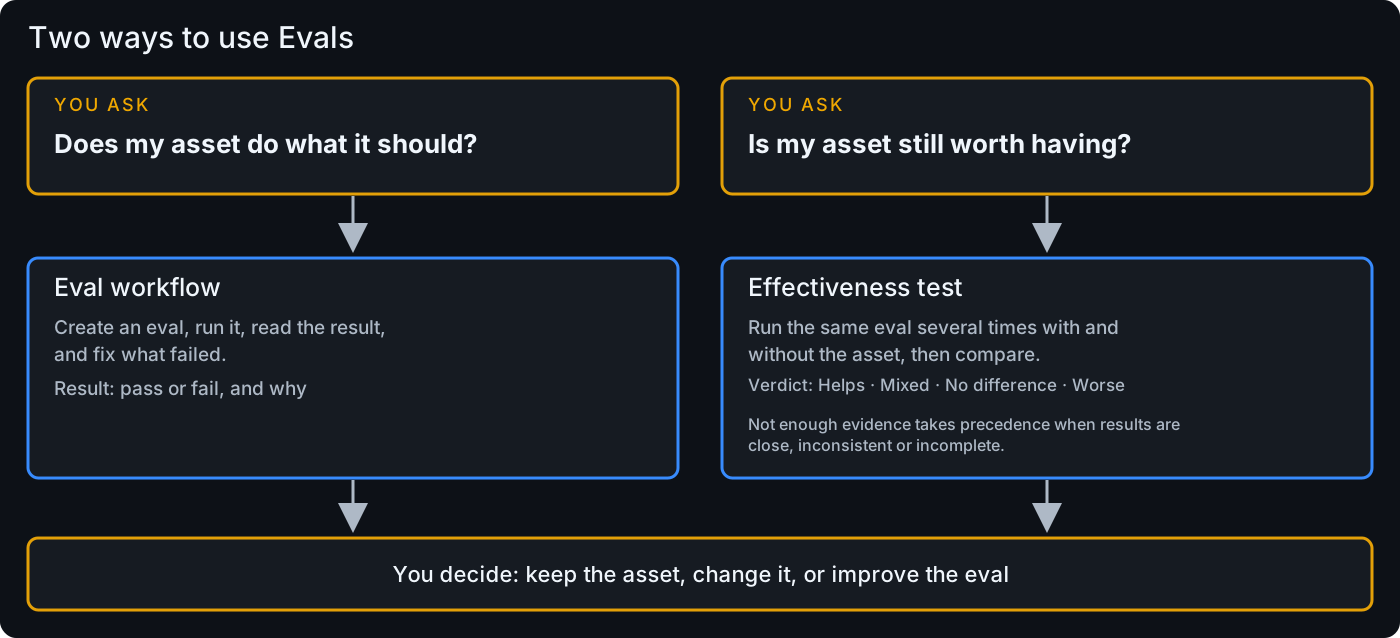
| Did my edit help? | Rerun the same eval and compare results for fixes and new failures where supported. |
| Are my instructions still useful? | Test today’s tasks; where supported, try a task with the skill included, then left out of the prepared inputs. |
Check whether your skills help. A single result is a starting point, not proof of reliability or universal benefit.
Create. Run. Compare.
- Create: choose a task, inputs, and checks. Review the proposed files before saving.
- Run: review and separately approve execution. Read the answer as well as the check results.
- Compare: change one thing, rerun, and inspect the saved results. Comparing reports does not start a run.
If a check catches a wrong answer, investigate the skill or agent. If a wrong answer passes, improve the check. Don’t make the test easier just to get green.
Take the next step
Choose your first task or run your first eval. Already have a useful local eval? Add it to CI to catch regressions when you change code.
Two questions, different evidence