
Compare saved runs
See what changed after a revision without mistaking different tests for better results.
Choose your app
 Compare in Copilot CLI
Select saved results from before and after one change. Keep the task, inputs, checks and AI model the same.
Terminal command
copilot -p "Use the compare skill from the eval Plugin. Review these saved results from before and after the change. Check that Evals can compare them: matching eval, inputs, checks and model, with the source change recorded. Explain which mistakes were fixed, remain or are new, plus errors and missing details. If the runs cannot be compared, explain why. Do not run evals, score answers again or change files."- Open the right place
Start Copilot in the project containing your source and evals, with the Evals Plugin installed.
Set up Copilot CLI - Start Compare
/eval compare chooses saved results or one skill experiment. Saved results are read-only; approve experiment preparation and each run separately.
- Review what happens next
Saved-result comparison never runs evals or scores answers again. New experiments need separate approvals. Keep errors and incomplete results; suggestions do not change files.
Stop if a required check or approval is unavailable. Do not bypass a refusal with terminal commands.
Understand comparisons Compare in VS Code
Select saved results from before and after one change. Keep the task, inputs, checks and AI model the same.
Prompt to paste into Copilot Chat or the Canvas conversation
Review these saved results from before and after the change.
Check that Evals can compare them: matching eval, inputs, checks and model, with the source change recorded.
Explain which mistakes were fixed, remain or are new, plus errors and missing details.
If the runs cannot be compared, explain why. Do not run evals, score answers again or change files.- Open the right place
For native controls, use the extension and run GitHub Copilot Evals: Open Evals Canvas in your local project. It includes the Plugin.
Set up VS Code - Start Compare
In Compare, select compatible saved runs and read fixed, persistent and new failures. With/without testing needs separate setup.
- Review what happens next
Saved-result comparison never runs evals or scores answers again. New experiments need separate approvals. Keep errors and incomplete results; suggestions do not change files.
Stop if a required check or approval is unavailable. Do not bypass a refusal with terminal commands.
Understand comparisons Compare in GitHub Copilot App
Select saved results from before and after one change. Keep the task, inputs, checks and AI model the same.
Prompt to paste into the Canvas Copilot conversation
Review these saved results from before and after the change.
Check that Evals can compare them: matching eval, inputs, checks and model, with the source change recorded.
Explain which mistakes were fixed, remain or are new, plus errors and missing details.
If the runs cannot be compared, explain why. Do not run evals, score answers again or change files.- Open the right place
Open Evals Canvas in the intended GitHub Copilot App project session; confirm its selected folder.
Set up GitHub Copilot App - Start Compare
In Compare, select compatible saved runs and read fixed, persistent and new failures. With/without testing needs separate setup.
- Review what happens next
Saved-result comparison never runs evals or scores answers again. New experiments need separate approvals. Keep errors and incomplete results; suggestions do not change files.
Stop if a required check or approval is unavailable. Do not bypass a refusal with terminal commands.
Understand comparisonsCompare in VS Code Agents
Select saved results from before and after one change. Keep the task, inputs, checks and AI model the same.
Prompt to paste into your VS Code Agents Copilot conversation
Review these saved results from before and after the change.
Check that Evals can compare them: matching eval, inputs, checks and model, with the source change recorded.
Explain which mistakes were fixed, remain or are new, plus errors and missing details.
If the runs cannot be compared, explain why. Do not run evals, score answers again or change files.- Open the right place
Open your prepared project in VS Code Agents with its supported Plugin/Canvas setup.
Set up VS Code Agents - Start Compare
Select the file or saved results and send the request in VS Code Agents's Copilot conversation; use that app's approval controls.
- Review what happens next
Saved-result comparison never runs evals or scores answers again. New experiments need separate approvals. Keep errors and incomplete results; suggestions do not change files.
Stop if a required check or approval is unavailable. Do not bypass a refusal with terminal commands.
Understand comparisons Compare in Visual Studio
Select saved results from before and after one change. Keep the task, inputs, checks and AI model the same.
Visual Studio Copilot Chat command
/eval-compare Review these saved results from before and after the change. Check that Evals can compare them: matching eval, inputs, checks and model, with the source change recorded. Explain which mistakes were fixed, remain or are new, plus errors and missing details. If the runs cannot be compared, explain why. Do not run evals, score answers again or change files.- Open the right place
Open your local solution or folder in Visual Studio and open View > Other Windows > GitHub Copilot Evals (or enter /eval-canvas in Copilot Chat).
Set up Visual Studio - Start Compare
In Compare, select compatible saved runs and read fixed, persistent and new failures. With/without testing needs separate setup.
- Review what happens next
Saved-result comparison never runs evals or scores answers again. New experiments need separate approvals. Keep errors and incomplete results; suggestions do not change files.
Stop if a required check or approval is unavailable. Do not bypass a refusal with terminal commands.
Understand comparisons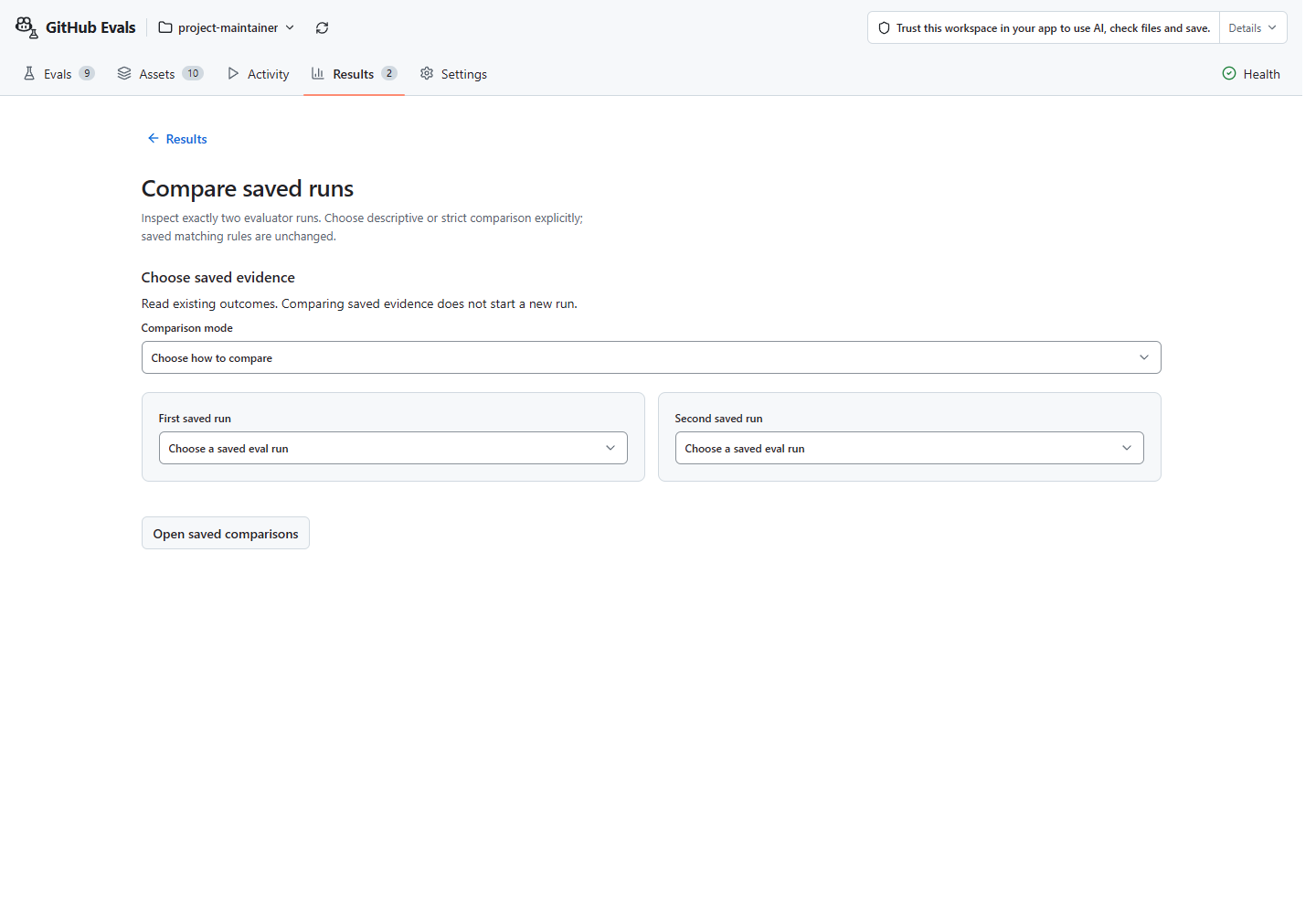
Choose your app to see how to start. Start with the first-eval guide for the general steps.
With/without benefit is not proven. Separate pass counts do not prove a skill improved. Read the current limits.
Choose the comparison mode
Keep the original result. Change one thing, approve a rerun, then inspect both saved results. For a skill revision, keep task, inputs, checks, and model unchanged.
Choose Compare saved results to read two existing runs without execution. Side-by-side results shows separate counts, not matched eval cases. View details shows the evidence behind those counts.
Use compatible saved runs
Matched test comparison is the UI label for comparing matching eval cases; here, “test” means an eval case, not a different workflow. It requires matching evidence and one change. Reading results starts no runs or edits. Canvas’s Save comparison action writes the report without another approval prompt; it never reruns either eval. Details.
Using a standalone MCP connection
evals_compare_saved_runs reads two emitted saved-run handles with explicit
descriptive or strict mode. Strict mode returns eligible axes before an
exact axisKey selects the report. It starts no execution and publishes no
receipt. MCP selection and limits.
Advanced: with/without experiments
The built Copilot CLI / GitHub Copilot App /eval compare also offers a separate skill experiment.
Explore one skill on one task.
Approve preparation and each run separately. Leaving the skill out of the prepared inputs does not prove no copy was available.